


NEW in Origin: Custom spending categories & Mint import tools


With Mint shutting down its doors, you might be looking for an alternative. We’ve got you covered here at Origin.
We recently rolled out two new spending features, designed to give you a seamless transition from Mint to Origin and make your money management even better.
It’s time. Say hello to custom spending categories!

Everyone’s spending is unique, and so is the way we break down and visualize our expense patterns. We made it easier than ever to tailor your spending categories to fit your lifestyle. Whether you’re tracking holiday spending with a dedicated “Holiday Gifts” category or creating a category for your favorite hobby, Origin empowers you to manage your money in a way that makes sense for you.
Looking for custom spending category inspo? Since launching this new feature, here are a few of the most popular new categories we've seen our customers add:
- Pet Needs
- Coffee Shops
- Holiday Gifts
- Home Renovation
But that’s not all—our second new feature is a game changer for Mint users.
Introducing: Mint import tools
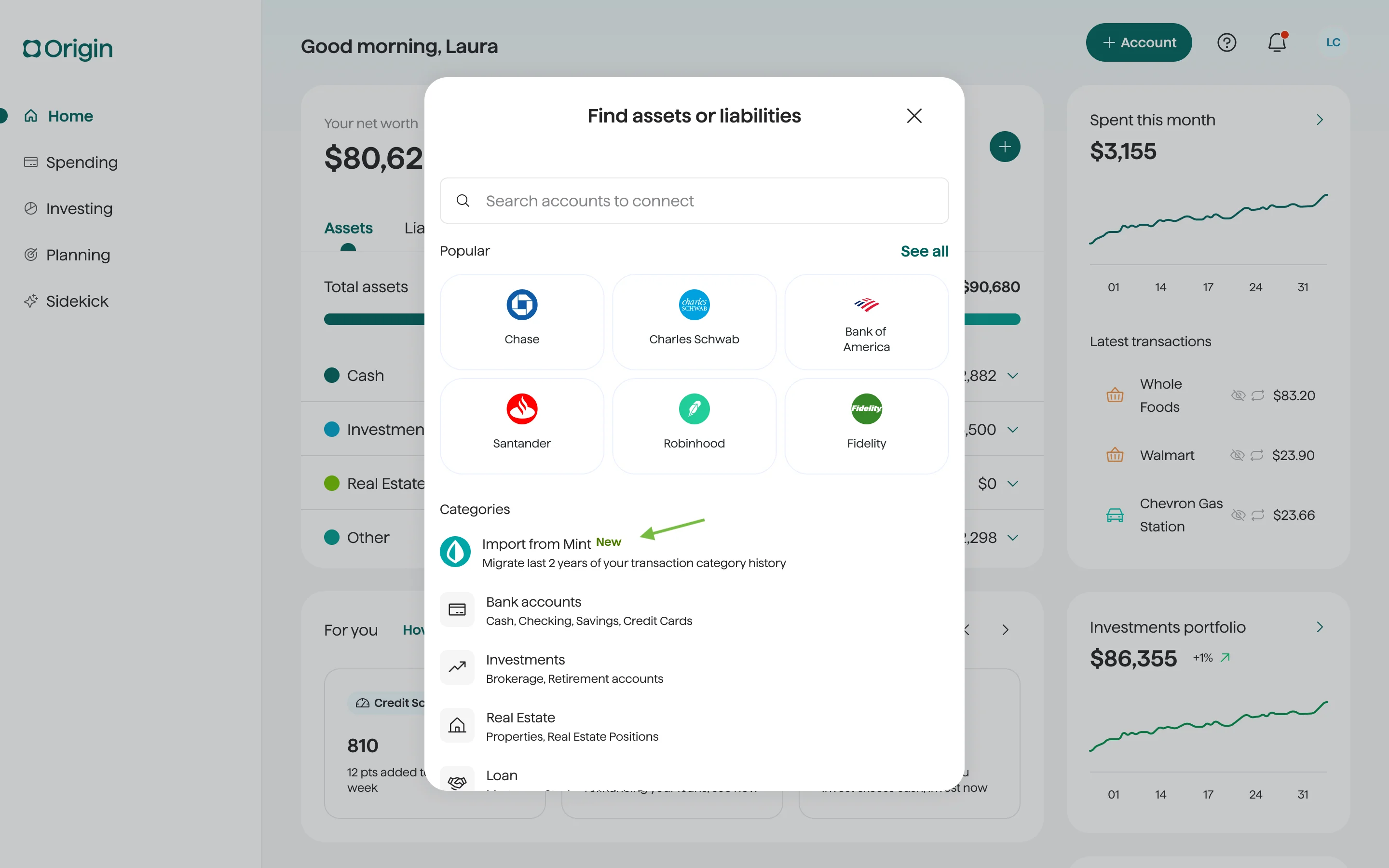
Since Mint announced its upcoming shutdown, we’ve seen a big influx of new users looking for an alternative. So, we made it as seamless as possible to move your categories and transactions from Mint to Origin.
Now, you can import your Mint history directly into Origin. Effortlessly upload your Mint-exported CSV file right into Origin, and we’ll preserve your categorization history for up to 2 years of transactions.
Wondering how to get started? Simply click the “+” button on your Dashboard to import your Mint data right into Origin. Only available on desktop.
But why choose us over other alternatives?
Great question. Time is money, and Origin saves you both.
We’re not just another budgeting app. We’re the ultimate all-in-one money management platform.
From tracking your spending and identifying unwanted subscriptions to monitoring your credit score, investing without advisory fees, and DIY free tax filing included in your Origin membership, we’re here to simplify your financial life. We want to save our customers time, give them peace of mind, and remove complexity from the financial journey.
Ready to talk, track, and grow your money? Let’s go. You can do it all with us. Try Origin for one month free here.
Answers to your questions
Yes. Origin offers partner access so you can manage your finances together at no additional cost. You’ll be able to filter transactions by member—making it easy to see which spending is yours and which belongs to your partner.

Yes. You can edit existing transactions and add new ones directly in Origin, so your records stay accurate and personalized.
Origin connects securely through trusted partners including Plaid, MX, and Mastercard.
Yes. Origin supports CSV uploads. You can upload a .csv file of your transactions, and we’ll import them into your account.
Yes. Your data is protected with bank-level security and advanced encryption. When you connect accounts through Origin, your login credentials are never shared with us. Instead, our partners generate secure tokens that let Origin access only the data you authorize—keeping your personal information private while enabling personalized insights.
Yes. You have full control to organize your spending in Origin. Transactions are automatically categorized by Origin, but you can always edit categories, add your own tags, and filter transactions however you like—so your spending reflects the way you actually manage money.